

A technical SEO audit is the fastest way to find out why a good website is not ranking as well as it should. You can publish great content, build strong links, and still lose traffic if search engines cannot crawl your pages, understand them, or load them quickly. In 2026, when AI search results and voice answers pull from a smaller set of trusted pages, those hidden technical problems matter more than ever.
This guide walks you through a complete technical SEO audit in nine practical checks. Each check explains what to look for, the tools to use, and the fix that moves rankings. Work through them in order, fix the high-impact issues first, and you will have a site that search engines can find, trust, and reward.
📋 Table of Contents
- What Is a Technical SEO Audit?
- Check 1: Crawlability and Robots.txt in Your Technical SEO Audit
- Check 2: Indexation and Your XML Sitemap
- Check 3: Site Architecture and Internal Linking
- Check 4: Core Web Vitals and Page Speed
- Check 5: Mobile Usability in a Technical SEO Audit
- Check 6: Structured Data and Schema Markup
- Check 7: Duplicate, Canonical, and Thin Content
- Check 8: HTTPS, Redirects, and Broken Links
- Check 9: Metadata and Search Appearance
- How to Prioritise Fixes After a Technical SEO Audit
- Key Takeaways
- Frequently Asked Questions
What Is a Technical SEO Audit?
A technical SEO audit is a systematic review of how easily search engines can discover, crawl, render, and index your website. Unlike a content audit, which judges topics and quality, a technical SEO audit judges infrastructure: servers, code, links, speed, and structured data. Think of it as a health check for the foundation your rankings stand on.
Why does it matter so much in 2026? Google now indexes pages with a mobile-first crawler, rewards fast and stable pages through Core Web Vitals, and increasingly answers queries directly with AI Overviews. Pages with crawl errors, slow loads, or missing schema are simply less likely to be chosen, and slow pages lose visitors fast.

A technical SEO audit turns guesswork into a ranked list of fixes, starting with the issues that cost the most traffic.
Before you start, gather your tools. Google Search Console is free and essential for crawl and indexation data. Screaming Frog or Sitebulb crawls your site the way a search engine does. PageSpeed Insights and Lighthouse measure speed and stability. Your content management system, hosting dashboard, and analytics complete the picture. For teams using AI tools to speed up audit reporting, these AI tool guides offer step-by-step AI tutorials that can help you automate repetitive checks without losing the human review that matters.
🔍 Check 1: Crawlability and Robots.txt in Your Technical SEO Audit
Crawlability comes first in any technical SEO audit because a page that cannot be crawled cannot rank. Start by checking your robots.txt file: it should allow search engines to reach important pages and block only genuinely private areas such as admin pages, staging sites, and internal search results. A single misplaced “Disallow: /” has wiped whole sites from search results, so verify this file before anything else.
Next, run a full crawl and look for server errors (5xx), broken internal links, redirect chains, and orphan pages with no internal links pointing to them. Check your crawl budget too: large sites waste it on faceted URLs, infinite calendars, and duplicate parameter pages. Use Search Console’s crawl stats and settings to see how often Googlebot visits and whether it hits errors. Fix server errors first, then redirect chains, then orphans, because each one either blocks ranking or wastes the crawl attention your best pages need.
🗂️ Check 2: Indexation and Your XML Sitemap
Being crawled is not the same as being indexed. In this stage of your technical SEO audit, compare three numbers: pages your crawler found, pages in your XML sitemap, and pages Google reports as indexed in Search Console. Big gaps point to real problems — pages blocked by noindex tags, canonical tags pointing elsewhere, or thin pages Google chose not to index.
Your XML sitemap should list only canonical, indexable, live pages, and it should be submitted in Search Console. Remove redirected, 404, and noindex URLs from it. Then review the “Page indexing” report for patterns: if whole sections show “Discovered — currently not indexed” or “Crawled — currently not indexed,” look for thin content, duplicate templates, or weak internal linking. Adding strong internal links from popular pages often gets valuable pages indexed faster than resubmitting a sitemap alone.
🏗️ Check 3: Site Architecture and Internal Linking
Good architecture helps both users and crawlers. In a technical SEO audit, check that every important page is reachable within three clicks of the homepage and that category pages link logically to subcategories and articles. Flat, logical structures pass authority more evenly than deep, tangled ones.
Internal linking is where many audits find quick wins. Link from high-traffic pages to pages that deserve more visibility, use descriptive anchor text that tells readers and search engines what the linked page covers, and avoid linking every page to every other page, which dilutes the signal. Our guide to schema markup for SEO shows how structured data works alongside internal links to help search engines understand page relationships. Audit your anchor text for over-optimisation as well: natural, varied anchors beat exact-match repetition.
⚡ Check 4: Core Web Vitals and Page Speed
Speed is a ranking factor and a conversion factor. The Core Web Vitals — Largest Contentful Paint (how fast the main content loads), Interaction to Next Paint (how quickly the page responds), and Cumulative Layout Shift (how stable the layout stays) — are now central to a technical SEO audit. Test your homepage, top landing pages, and worst-performing templates in PageSpeed Insights, not just one page.
Common fixes include compressing and resizing images, serving modern formats such as WebP, enabling caching and a content delivery network, removing unused JavaScript, and reserving space for images and ads so content does not jump. For a deeper walkthrough, see our Core Web Vitals optimisation guide. Aim for “Good” thresholds on real mobile connections, because that is how most of your visitors — and Google’s crawler — experience the site.
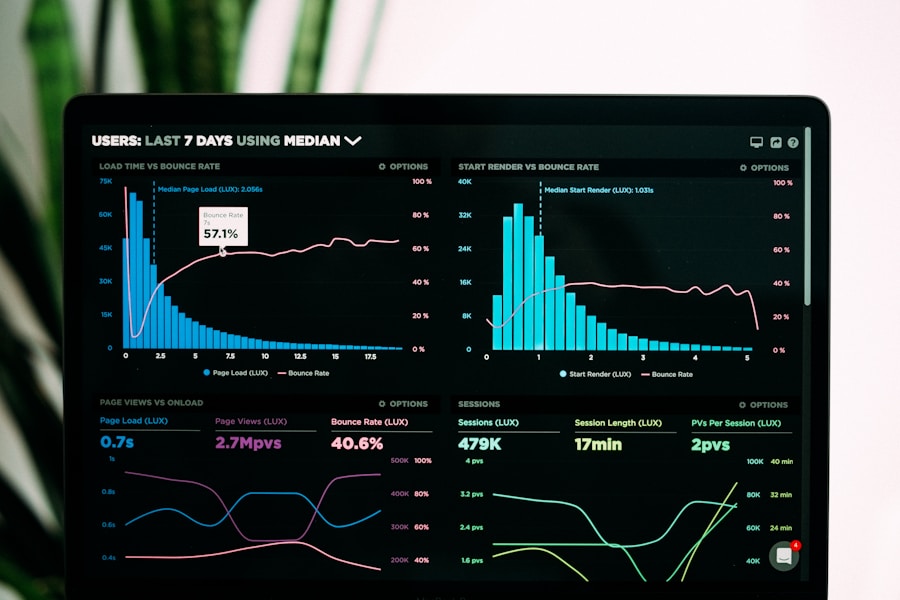
Core Web Vitals turn speed from a vague complaint into three measurable targets you can fix one by one.
📱 Check 5: Mobile Usability in a Technical SEO Audit
Google indexes the mobile version of your site first, so a technical SEO audit that only checks desktop is incomplete. Test on real phones, not just responsive previews: tap targets should be large enough, text should be readable without zooming, menus should work with a thumb, and no content should require horizontal scrolling. Check Search Console’s mobile usability and Core Web Vitals reports for device-specific errors.
Pay special attention to mobile-only problems: pop-ups that cover the main content, images that overflow the viewport, and JavaScript features that fail on slower connections. If mobile and desktop content differ, make sure headings, structured data, and internal links match.
🧩 Check 6: Structured Data and Schema Markup
Structured data is the vocabulary that tells search engines what your content means. In a technical SEO audit, validate your schema with Google’s Rich Results Test and check Search Console’s enhancements reports for errors and warnings. Product, article, FAQ, breadcrumb, organisation, and local business schema are the most useful for most sites, but only mark up content that visitors can actually see on the page.
Bad schema is worse than no schema: incorrect prices or FAQ markup on pages without FAQs can trigger lost rich results. Keep your markup in JSON-LD, test it after every template change, and monitor it monthly. Well-implemented schema can earn rich results that lift click-through rates even when rankings stay the same.
📄 Check 7: Duplicate, Canonical, and Thin Content
Duplicate content confuses search engines about which page should rank. During a technical SEO audit, search for duplicate titles, meta descriptions, and near-identical body content, especially on e-commerce sites with filtered category pages and sites with both www and non-www or HTTP and HTTPS versions live. Canonical tags should point each duplicate group to one preferred URL, and that URL should be the one linked internally and listed in the sitemap.
Thin content deserves the same attention. Pages with very little unique value — auto-generated location pages, empty tag archives, or near-duplicate product descriptions — rarely rank and can drag down a site’s overall quality signals. Either expand them with genuinely useful, original content, consolidate them into stronger pages with redirects, or noindex them if they serve users but should not compete in search. Quality beats quantity in every audit.
🔒 Check 8: HTTPS, Redirects, and Broken Links
Security and link hygiene are quiet ranking factors that a technical SEO audit must verify. Every page should load over HTTPS with a valid certificate, no mixed-content warnings, and no HTTP version left indexable. Check for redirect chains (A to B to C) and redirect loops, which waste crawl budget and slow down users; each old URL should redirect directly to its final destination with a 301 status.
Then hunt broken links, both internal and external. Fix or remove them, and review your most-linked 404 pages: if visitors still link to a deleted page, restore it or redirect it to the closest relevant replacement.
✍️ Check 9: Metadata and Search Appearance
The final check in your technical SEO audit is how your pages actually appear in search results. Review titles and meta descriptions at scale: titles should be unique, descriptive, and under about 60 characters, while descriptions should be compelling summaries of 120 to 160 characters. Missing, duplicated, or truncated metadata is one of the most common audit findings — and one of the easiest to fix for a fast click-through lift.
Check favicons, Open Graph tags for social sharing, and hreflang tags if you serve multiple languages or regions. Then search for your brand and a sample of target queries to see what searchers really see, including AI Overviews and featured snippets. Pages that win those surfaces usually combine strong technical health with clear, well-structured answers — exactly what the previous eight checks prepare you for. Google’s own Search Central documentation remains the authoritative reference for how crawling, indexing, and ranking work.

Metadata is your shop window in search results — clear titles and descriptions earn the click before content earns the conversion.
How to Prioritise Fixes After a Technical SEO Audit
Do not try to fix everything at once. Rank issues by traffic impact and effort: blocking errors (robots mistakes, server errors, deindexing) first, then speed and mobile problems on top pages, then schema, duplicates, and metadata. Create one ticket per issue type with the affected URLs, the fix, and the owner, and re-crawl after each batch to confirm the fix worked. For a broader audit framework, our SEO audit checklist pairs well with this technical review.
Repeat the technical SEO audit quarterly, and after any redesign, migration, or major platform change. Set up Search Console alerts, monitor Core Web Vitals monthly, and track indexed pages weekly. Technical SEO is maintenance that protects every other marketing investment you make.
✅ Key Takeaways
- A technical SEO audit checks crawlability, indexation, architecture, speed, mobile usability, schema, duplicates, security, and search appearance.
- Fix blocking errors first, then speed and mobile issues on your highest-traffic pages.
- Use Search Console, a site crawler, and PageSpeed Insights for evidence, not guesswork.
- Repeat the audit quarterly and after every redesign or migration.
- Strong technical health makes content and links work harder — it is the foundation of lasting rankings.
❓ Frequently Asked Questions
How often should I run a technical SEO audit?
Run a full technical SEO audit at least quarterly, and immediately after a redesign, migration, hosting change, or traffic drop. Monitor Search Console and Core Web Vitals weekly between audits so small issues do not become ranking losses.
How long does a technical SEO audit take?
A small site can be audited in a day; a large e-commerce or publisher site may take one to two weeks including fixes and re-crawls. The audit itself is fast — prioritising and implementing fixes is where most of the time goes.
Do I need paid tools for a technical SEO audit?
No. Google Search Console, PageSpeed Insights, and Lighthouse cover the essentials for free. Paid crawlers such as Screaming Frog or Sitebulb save time on large sites, but they are a convenience, not a requirement.
Can a technical SEO audit alone improve rankings?
Yes, when it finds blocking issues — a bad robots rule, mass deindexing, or crippling speed problems. For already-healthy sites, the audit protects rankings and supports content and link-building efforts rather than replacing them.
What is the difference between a technical SEO audit and an SEO audit checklist?
A technical SEO audit focuses on infrastructure: crawling, indexing, speed, and code. A general SEO audit checklist also covers content quality, keyword targeting, and backlinks. Use both together for a complete picture.
Sources and further reading: Google Search Central documentation, PageSpeed Insights, and industry Core Web Vitals research. This guide is for general information; test every change on staging before deploying it to a live site.