

AI data analytics tools are changing how businesses turn raw numbers into revenue. Instead of waiting days for a data team to build a report, a founder can upload a spreadsheet, ask a plain-English question, and get a boardroom-ready chart in seconds. If you run a business in 2026 and still make decisions on gut feeling, this guide is for you.
In this article, we compare the 9 best AI data analytics tools in 2026 — covering features, starting prices, and who each platform is really built for — so you can pick the right one without wasting money on the wrong plan.
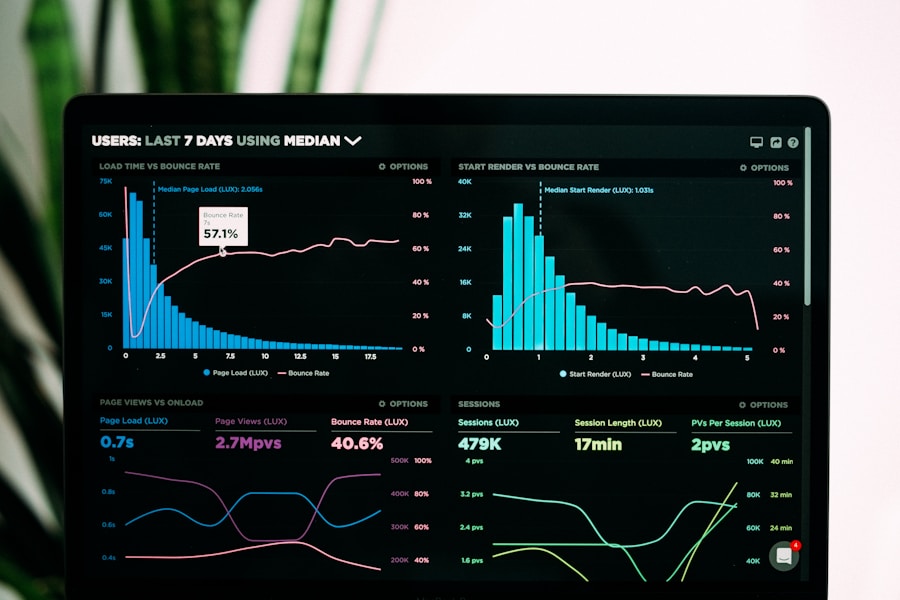
Modern AI data analytics tools turn raw spreadsheets into interactive dashboards automatically.
📌 Key Takeaways
- AI data analytics tools use machine learning and natural language to automate data cleaning, analysis, and visualization — no coding required.
- The 2026 best picks: Julius AI, Microsoft Power BI, Tableau, ThoughtSpot, Polymer, Akkio, Google Looker, Domo, and Zoho Analytics.
- Pricing runs from free plans to roughly $14–$50/user/month for SMB tiers; enterprise platforms are custom-priced.
- Choose based on your data sources, team size, and budget — not feature lists alone.
- Businesses that pair AI analytics with a clear decision process typically cut reporting time by 50–80%.
Table of Contents
- What Are AI Data Analytics Tools?
- Why Businesses Are Switching to AI Analytics in 2026
- The 9 Best AI Data Analytics Tools in 2026
- AI Analytics vs Traditional BI: Quick Comparison
- How to Choose the Right AI Data Analytics Tool
- 5 Steps to Implement AI Analytics in Your Business
- FAQs
📋 What Are AI Data Analytics Tools?
AI data analytics tools are software platforms that use artificial intelligence — machine learning, natural language processing, and automated statistics — to handle the heavy lifting of data analysis. Upload your sales CSV, connect your Shopify store, or link your ad accounts, and the platform cleans the data, finds patterns, forecasts trends, and builds visual dashboards for you.
The biggest difference from old-school BI is the interface. Modern AI analytics software lets you ask questions in plain English — “Which product category grew fastest last quarter?” — and the AI writes the query, runs the analysis, and answers with charts and plain-language explanations.
For small and mid-sized businesses, this is a genuine game-changer: a solo founder or a 20-person ecommerce brand can now run the same caliber of analysis that used to require a six-figure analytics hire.
🤖 Why Businesses Are Switching to AI Analytics in 2026
The shift toward AI-powered analytics is not hype — it is being driven by hard economics:
- Speed: Industry surveys consistently show that teams using AI-assisted analytics cut report-building time dramatically, often by half or more, because data cleaning and chart-building are automated.
- Cost: Market research firms estimate the AI analytics segment is growing at over 25% CAGR, and competition has pushed entry pricing down — several top platforms now offer capable free tiers.
- Decision quality: Executives now expect forecasts and anomaly alerts — exactly what AI data analytics tools generate automatically.
- Data volume: The average SMB pulls data from 5–10 sources (ads, CRM, email, ecommerce, payments) — manual analysis cannot keep up.
Better analytics means you see which campaigns actually convert, which products carry your margin, and which segments are worth scaling — directly feeding a stronger business automation strategy and sharper ad spend.
🏆 The 9 Best AI Data Analytics Tools in 2026
We evaluated dozens of platforms on AI capability, ease of use, integrations, and pricing. Here are the nine that made the cut.
1. Julius AI — Best Conversational Data Analyst
Julius AI works like ChatGPT for your spreadsheets. Upload a CSV, Excel file, or connect Google Sheets, then ask questions in plain English — it runs the analysis and returns charts, summaries, and cleaned datasets.
- Standout AI features: Natural-language querying, automated chart generation, data cleaning, statistical modeling.
- Pricing: Free tier available; paid plans from around $20/month.
- Best for: Freelancers, marketers, and small businesses that live in spreadsheets. If you want to learn the ropes of AI-assisted analysis, start with the step-by-step AI tool guides approach: one dataset, one question at a time.
2. Microsoft Power BI + Copilot — Best for Microsoft Shops
Power BI remains the value king of enterprise BI, and Microsoft’s Copilot integration adds AI-generated summaries, anomaly detection, and natural-language Q&A on top of your dashboards. If your company already runs on Microsoft 365, the integration advantage is enormous.
- Standout AI features: Copilot narrative summaries, smart anomaly detection, AI-powered quick insights, natural-language Q&A.
- Pricing: Free desktop version; Pro from around $14/user/month; Premium capacity for larger deployments.
- Best for: Companies already invested in Excel, Teams, and Azure — especially finance and operations teams.
3. Tableau + Einstein — Best Visual Analytics
Tableau, now part of Salesforce, pairs best-in-class visualization with Einstein AI: automated “Data Stories”, predictive modeling, and AI-assisted data prep.
- Standout AI features: Einstein-generated explanations, predictive analytics, automated insight discovery.
- Pricing: From around $35/user/month (Creator); cheaper Viewer roles for dashboard consumers.
- Best for: Enterprises and data-mature teams that want beautiful, deeply interactive dashboards.
4. ThoughtSpot — Best Search-Driven Analytics
ThoughtSpot pioneered the “Google for your data” concept. Type or speak a question — “revenue by region last 90 days” — and get an instant, interactive answer. Its AI engine, Spotter, now generates full analyses from a single prompt.
- Standout AI features: Search-based querying, AI-generated answers (Spotter), automated KPI monitoring with alerts.
- Pricing: Free trial; custom pricing for teams (typically mid-market and up).
- Best for: Non-technical teams that want self-service analytics without learning any BI tool.
5. Polymer — Best No-Code Dashboards for Startups
Polymer turns a messy spreadsheet into a polished, shareable dashboard in minutes. Its AI suggests visualizations, cleans inconsistent data, and embeds live dashboards anywhere.
- Standout AI features: One-click dashboard generation from spreadsheets, AI-suggested charts, smart data cleaning.
- Pricing: From around $20/month; free plan for basic use.
- Best for: Startups, ecommerce sellers, and agencies that need client-ready dashboards fast.
6. Akkio — Best No-Code AI Predictions
Akkio focuses on what most tools skip: predictive analytics for non-technical users. Upload historical data and predict churn, forecast sales, or score leads — no code, no statistics degree.
- Standout AI features: No-code machine learning models, lead scoring, churn prediction, demand forecasting, one-click deployment.
- Pricing: Free tier; paid plans from around $50/month.
- Best for: Agencies, SaaS companies, and SMBs that want forecasts, not just reports.
7. Google Looker + Gemini — Best Governed BI for Data Teams
Looker (Google Cloud) is the choice for organizations that want a single, governed source of truth. Gemini adds conversational analytics and AI-generated LookML, so analysts move faster while governance stays intact.
- Standout AI features: Conversational analytics in Slack and dashboards, AI-assisted modeling, automated insight summaries.
- Pricing: Custom enterprise pricing via Google Cloud.
- Best for: Data teams on Google Cloud that need governed, scalable analytics.
8. Domo — Best All-in-One Data Platform
Domo combines 1,000+ data connectors, warehousing, AI analytics, and app-building in one platform. Its AI generates narratives, detects anomalies, and automates alerts in real time.
- Standout AI features: AI-generated data stories, real-time anomaly alerts, 1,000+ prebuilt connectors, low-code app builder.
- Pricing: Custom pricing; free trial available.
- Best for: Mid-market and enterprise companies that want one platform from ingestion to insight.
9. Zoho Analytics + Zia — Best Budget Pick
Zoho Analytics delivers serious BI at a fraction of enterprise prices, and its AI assistant Zia answers questions conversationally, forecasts trends, and flags anomalies automatically.
- Standout AI features: Conversational assistant (Zia), smart auto-analysis, forecasting, anomaly detection, 500+ integrations.
- Pricing: Free plan; paid from around $24/month.
- Best for: Budget-conscious SMBs, especially those already using Zoho CRM or Zoho Books.

Teams using AI data analytics tools spend less time building reports and more time acting on insights.
⚖️ AI Analytics vs Traditional BI: Quick Comparison
| Factor | AI Data Analytics Tools | Traditional BI |
|---|---|---|
| Getting started | Upload data, ask questions | Learn query language + builders |
| Report building | Automated in seconds | Manual, hours to days |
| Forecasting | Built-in AI predictions | Requires data scientists |
| Technical skill needed | Low to none | Medium to high |
| Cost for SMBs | Free–$50/month tiers common | Often enterprise-priced |
| Best for | Fast decisions, lean teams | Large governed data teams |
Large enterprises with strict governance still need traditional BI. But for everyone else — agencies, ecommerce brands, SaaS startups — AI data analytics tools deliver 90% of the value at a fraction of the cost.
🧭 How to Choose the Right AI Data Analytics Tool
Before buying any of these AI data analytics tools, run this six-point test instead of trusting feature checklists:
- Your data sources: List where your data lives (Shopify, Meta Ads, CRM, spreadsheets) and pick a tool with native connectors for your top three — this matters more than any AI feature.
- Team technical level: Non-technical team? Prioritize conversational tools like Julius AI, ThoughtSpot, or Polymer. Have analysts? Power BI or Looker give more control.
- Decision speed: If you need answers daily, favor tools with automated alerts and anomaly detection (Domo, Zoho Analytics, Power BI).
- Budget reality: Start with a free tier. Most SMBs never outgrow the $20–$50/month plans. Enterprise custom pricing is only worth it past ~50 regular users.
- Forecasting needs: If predictions (churn, demand, LTV) are the goal, shortlist Akkio and tools with built-in ML — most dashboard tools only describe the past.
- Ecosystem fit: Microsoft shop → Power BI. Google Cloud shop → Looker. Zoho user → Zoho Analytics. Ecosystem fit cuts integration pain dramatically.
One more tip: if you are already investing in AI across marketing, your analytics choice should plug into that stack. Our guide to the best AI SEO tools shows how analytics and SEO tooling increasingly overlap in 2026.
🚀 5 Steps to Implement AI Analytics in Your Business
- Audit your data (Week 1): List every data source and export a sample — clean duplicates and messy formats first, because AI amplifies bad data as fast as good data.
- Pick one tool and one question (Week 2): Start with a free tier and a single high-value question, e.g. “Which ad campaign has the best ROAS this month?” One question keeps the pilot focused and measurable.
- Connect and validate (Week 3): Connect your real data and cross-check the AI’s answers against numbers you trust — this catches configuration mistakes early.
- Automate the routine (Week 4): Set up scheduled reports, anomaly alerts, and a shared dashboard — so nobody manually builds the weekly report again.
- Expand to predictions (Month 2+): Once descriptive analytics is trusted, move to forecasting — churn prediction, inventory planning, budget allocation. This is where ROI compounds.
Businesses in data-heavy verticals see the fastest payback. Banks, for example, are already using these platforms for fraud detection and credit modeling — see how AI is transforming banking in 2026 for concrete use cases.

From automated reports to demand forecasting, AI data analytics tools cover the full insight pipeline.
❓ Frequently Asked Questions
What are AI data analytics tools?
AI data analytics tools are platforms that use artificial intelligence to automate data cleaning, analysis, visualization, and forecasting. Instead of writing queries or building charts manually, you ask questions in plain English and the AI produces answers, dashboards, and predictions automatically.
Are AI data analytics tools better than traditional BI?
For speed and ease of use, yes — most teams get insights far faster. Traditional BI still wins for strict enterprise governance. Most SMBs and agencies are better served by AI-first platforms.
How much do AI data analytics tools cost?
Several top platforms offer free tiers (Julius AI, Zoho Analytics, Power BI Desktop). Paid SMB plans typically run $20–$50/month, while enterprise platforms like Tableau, Domo, and Looker use custom pricing that can reach hundreds per user monthly.
Do I need coding skills to use AI data analytics tools?
No. The defining feature of AI data analytics tools is natural-language interaction — you ask questions in English and the AI handles the technical work. Tools like Julius AI, Polymer, and ThoughtSpot are explicitly built for non-technical users.
Which AI data analytics tool is best for small business?
For most small businesses, Zoho Analytics (best value) or Julius AI (easiest start) are the smartest first picks. If you already use Microsoft 365, Power BI is the natural choice. Start free, prove value on one business question, then upgrade.
Is my business data safe with AI analytics platforms?
Reputable platforms use encryption, SOC 2 compliance, and role-based access. Always check a vendor’s security page before connecting sensitive data — and prefer platforms that do not train models on your private data.
Bottom line: the businesses winning in 2026 are not the ones with the most data — they turn data into decisions fastest. Pick one of the nine AI data analytics tools above, start with a free tier this week, and let AI do the heavy lifting while you focus on growth.
Sources & notes: Tool features and starting prices reflect publicly listed plans as of October 2026 and may change — always verify on the vendor’s pricing page before purchasing. Market growth figures are industry estimates. For related reading, see our guides on Gartner’s analytics research and McKinsey’s reporting on AI adoption in business.