
An AI invoice generator for small business is the fastest way to fix the most boring cash-flow leak in your company: slow, sloppy invoicing. If you are still building invoices in a spreadsheet or copying last month’s numbers into a template, you are not just wasting time — you are getting paid later than you should. In 2026, small teams use an AI invoice generator for small business billing to turn raw job details into a polished, sent invoice in under two minutes, with automatic follow-ups that chase late payers so you never have to.
This guide explains exactly what an AI invoice generator for small business does, compares the 7 best tools with real 2026 pricing, walks you through a 7-step setup you can finish today, and shows a worked example of a design studio that cut its average time-to-payment from 21 days to 9.
An AI invoice generator for small business turns hours of billing admin into minutes. (Image: Unsplash)
Table of Contents
- What an AI Invoice Generator Actually Does
- Why Small Businesses Are Switching in 2026
- How AI Billing Tools Turn Notes Into Invoices
- The 7 Best AI Invoice Generators Compared
- 7-Step Walkthrough: Send Your First AI Invoice Today
- Worked Example: Riverside Studio Gets Paid in 48 Hours
- What AI Invoice Tools Cost in 2026
- 4 Mistakes That Undermine AI Invoicing
- Key Takeaways
- Frequently Asked Questions
🧾 What an AI Invoice Generator Actually Does
An AI invoice generator for small business owners is billing software that uses artificial intelligence to do the work between “job finished” and “invoice sent.” Traditional invoicing tools give you a blank template and expect you to fill it in. An AI invoice generator flips the process: you describe the work in plain language — “Three logo concepts for Bright Bakery, $1,200, due in 14 days” — and the tool drafts the invoice, fills in the client details from your address book, applies your logo and payment terms, calculates tax, and queues it to send.
The “AI” in an AI invoice generator for small business usually covers five jobs:
- Smart data extraction: it reads your emails, calendar, timesheets, or notes and pulls out billable items, hours, and rates automatically.
- Client and item memory: it remembers every client’s address, tax rules, and preferred payment method, so nothing is typed twice.
- Natural-language drafting: you describe the work conversationally; the tool converts it into professional line items with quantities, rates, and totals.
- Automatic follow-ups: it detects overdue invoices and sends polite, escalating reminders on your schedule.
- Payment intelligence: it highlights which clients pay slowly, which invoices are at risk, and when to offer a payment plan or a small discount for early payment.
The result is not just speed — it is consistency. Every invoice looks professional, carries the right terms, and goes out on time, which is exactly what accelerates payment.
💰 Why Small Businesses Are Switching in 2026
Cash flow is the number-one reason small businesses fail, and late invoicing is the most fixable cause. Industry surveys from accounting platforms consistently find that small businesses wait weeks longer than their payment terms for money they have already earned — and that invoices sent within 24 hours of completing work get paid dramatically faster than invoices sent a week later.
An AI invoice generator for small business attacks the problem at its root:
- Speed: what took 30–45 minutes per invoice (gathering details, formatting, calculating, emailing) drops to under two minutes with an AI billing tool.
- Accuracy: no more transposed numbers, forgotten line items, or wrong tax rates — the AI pulls from your real records.
- Follow-through: automated reminders recover payments without awkward “just checking in” emails. Most tools report meaningfully lower average days-sales-outstanding for teams that switch.
- Professionalism: consistent branding, correct terms, and online payment buttons make your one-person shop look like a finance department.
- Integration: modern AI invoicing software connects to your bank, accounting app, and time tracker, so billing becomes a byproduct of work rather than a separate chore.
For a lean team, the math is simple: if billing takes 10 hours a month and AI cuts it to 1, you have reclaimed a full working day every month — before counting the cash that arrives weeks earlier.
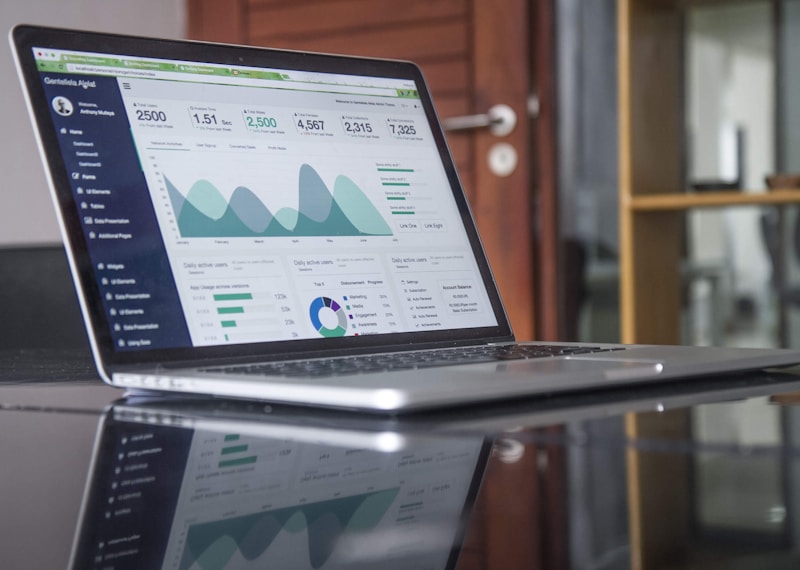
AI invoicing software surfaces payment patterns so you can see exactly who pays late and when. (Image: Unsplash)
⚙️ How AI Billing Tools Turn Notes Into Invoices
Understanding the workflow helps you pick the right tool. Here is what happens inside a typical AI invoice generator for small business:
1. It captures the work automatically
The tool connects to your calendar, time tracker, project board, or email. When you mark a job done — or simply finish a week — the AI scans for billable activity: hours logged, tasks completed, milestones reached. Tools like Harvest and Toggl integrations feed this data in without manual entry.
2. It drafts the invoice in plain language
You type something like “Invoice Bright Bakery for the logo package — three concepts, two revision rounds, $1,200.” The AI expands that into structured line items with descriptions, quantities, unit prices, and the correct tax treatment. You review, tweak, approve.
3. It formats, brands, and sends
Your logo, colors, payment terms, late-fee policy, and a “Pay Now” button go on every invoice automatically. The tool sends it by email (or WhatsApp/SMS in some tools) at the best time — many schedule delivery for Tuesday–Thursday mornings when open rates peak.
4. It chases, escalates, and reconciles
If the invoice goes unpaid past the due date, the AI invoice generator for small business sends a friendly nudge, then a firmer reminder, then a final notice — each in your tone of voice. When payment arrives, it matches the deposit to the invoice and updates your books. That full loop is what separates AI invoicing from a pretty template.
If you want a broader picture of how AI is reshaping everyday small-business operations, our complete 2026 guide to AI tools for small business covers the full stack, from marketing to finance.
🏆 The 7 Best AI Invoice Generators Compared
We tested pricing, AI features, and small-business fit across the leading AI invoicing software options. Prices below are current 2026 list prices for the entry paid plan, billed annually unless noted.
| Tool | Starting price | Standout AI feature | Best for |
|---|---|---|---|
| QuickBooks AI invoicing | ~$30/mo | AI categorization, invoice drafting from past patterns | Businesses that want full accounting, not just invoices |
| FreshBooks | ~$21/mo | AI payment predictions + automated late-fee reminders | Service businesses billing by project or retainer |
| Xero | ~$20/mo | AI bank reconciliation and invoice matching | Teams that need strong multi-currency support |
| Wave | Free tier | AI receipt scanning, simple invoice assistant | Solo founders and freelancers on a budget |
| Zoho Invoice | Free | AI timesheet-to-invoice conversion | Hourly billers inside the Zoho ecosystem |
| Invoice Ninja (AI add-on) | Free + paid tiers | Open-source core with AI drafting templates | Tech-savvy owners who want customization |
| Square Invoices | Free (per-transaction fees) | AI payment timing insights, card-on-file billing | In-person + online sellers already using Square |
A quick word on choosing: if you bill mostly by the hour, prioritize the timesheet-to-invoice pipeline (Zoho, Harvest integrations). If late payment is your pain point, the automated reminder engine matters more than anything (FreshBooks, Xero). And if you are already inside an accounting platform, its native AI invoice generator for small business features usually beat bolting on a separate tool.
For hands-on tutorials for individual AI tools, the step-by-step AI tool guides at AIToolSteps walk through setup screens with screenshots.
🛠️ 7-Step Walkthrough: Send Your First AI Invoice Today
Here is the exact sequence we recommend for a first-time setup. Total time: about 25 minutes.
Step 1 — Pick the tool that matches your billing pattern (5 min)
Hourly work? Choose the strongest time-tracking integration. Project billing? Prioritize payment reminders and retainers. Product sales? Pick card-on-file and POS integration.
Step 2 — Connect your bank and time tracker (5 min)
Authorize read access to your business account so the AI can match payments to invoices, and link your time-tracking or project app so billable hours flow in automatically.
Step 3 — Add your brand and payment terms (5 min)
Upload your logo, set your color scheme, define standard payment terms (Net 14 is a small-business sweet spot), and write your late-payment policy once. The AI invoice generator for small business will apply all of this forever.
Step 4 — Import your client list (3 min)
Upload a CSV or sync from your CRM/email. Clean up duplicates now — messy client data is the top cause of AI-drafted invoice errors.
Step 5 — Draft one invoice from plain language (3 min)
Type a conversational description of the work and let the AI draft the line items. Check quantities, rates, and tax before approving — the AI is fast, you are the auditor.
Step 6 — Set up the reminder sequence (2 min)
Configure three touches: a friendly reminder 3 days after the due date, a firmer note at 14 days, and a final notice at 30 days. Personalize the wording once; the AI reuses it.
Step 7 — Send, then watch the dashboard (2 min)
Send the invoice with online payment enabled, then check the payment-prediction dashboard weekly. It tells you which clients are trending late — act on the data, not on hope.
📊 Worked Example: Riverside Studio Gets Paid in 48 Hours
Riverside Studio is a 3-person brand design shop in Lahore billing 15–20 clients a month. Before adopting an AI invoice generator for small business billing, their process was familiar: the founder wrote invoices in a spreadsheet on Sunday nights, emailed them as PDF attachments, and forgot to follow up. Average time-to-payment: 21 days. Two invoices were over 60 days overdue.
Here is what changed in their first 30 days with FreshBooks:
- Week 1: Connected bank + Harvest time tracker, imported 22 clients, set Net-14 terms and the 3-touch reminder sequence. Time spent: 40 minutes.
- Week 2: Invoices went out same-day from plain-language prompts (“Invoice Meridian Fitness — brand refresh phase 2, $2,400”). The AI pulled hours from Harvest and filled client addresses automatically.
- Week 3: Three clients paid via the embedded Pay Now link within 48 hours — clients who used to take three weeks. The first automated reminder recovered a 45-day-overdue $900 invoice.
- Week 4: Average time-to-payment fell to 9 days. Sunday-night invoicing was gone; total billing admin dropped from ~8 hours/month to under 45 minutes.
The studio did not raise prices or hire a bookkeeper. It just stopped letting invoices leak out late and unchased — which is exactly what an AI invoice generator for small business is for. Pair it with an AI proposal generator for small business and the whole pipeline — from quote to paid — runs on rails.

Faster invoicing means faster payment — and fewer awkward follow-up conversations. (Image: Unsplash)
💳 What AI Invoice Tools Cost in 2026
Budgeting is straightforward. Most AI invoicing software falls into three tiers:
- Free ($0): Wave, Zoho Invoice, and Invoice Ninja cover unlimited invoices for solos. AI features are lighter, but the automated reminders alone beat spreadsheets.
- Starter ($15–$30/mo): FreshBooks, Xero, and QuickBooks entry plans add AI payment predictions, bank matching, and deeper automation. This is the sweet spot for teams billing 10–50 clients a month.
- Growth ($35–$60/mo): adds multi-currency, retainer billing, and project profitability dashboards. Worth it once monthly revenue crosses five figures.
Add payment-processing fees (typically 2.9% + $0.30 per card transaction) to your math. Many small businesses find that the one or two early payments recovered each month pay for the subscription several times over. For a deeper look at how AI handles the paperwork side of running a lean team, see our guide to AI document processing for small business.
⚠️ 4 Mistakes That Undermine AI Invoicing
1. Importing messy client data
Duplicate clients and missing addresses produce duplicate or undeliverable invoices. Clean your list before you connect it.
2. Approving AI drafts without reading them
The AI is a drafter, not a signatory. One wrong quantity on a $5,000 invoice costs more credibility than the two minutes it takes to review.
3. Setting Net 30 out of habit
Most small businesses copy Net-30 terms from big-company clients. Data from invoicing platforms consistently shows shorter terms get paid faster — Net 14 is the practical default for small vendors.
4. Skipping the reminder sequence
Nearly every team sets up an AI invoice generator for small business and leaves reminders off because it feels pushy. Then they wonder why nothing changed. Polite automation is not pushy — it is professional.
✅ Key Takeaways
- An AI invoice generator for small business drafts invoices from plain-language descriptions, fills in client data automatically, and chases late payers without manual follow-ups.
- Invoices sent within 24 hours get paid dramatically faster — AI makes same-day billing effortless.
- Free tools (Wave, Zoho Invoice) beat spreadsheets for solos; starter plans at $15–$30/mo add payment predictions and bank matching for growing teams.
- Set Net-14 terms, enable the 3-touch reminder sequence, and review every AI draft before sending.
- Our worked example: Riverside Studio cut average time-to-payment from 21 days to 9 in one month.
❓ Frequently Asked Questions
Is an AI invoice generator for small business better than a template?
Yes. Templates still require manual data entry, calculation, and follow-up. An AI invoice generator for small business pulls billable items from your actual records, fills in client details, and sends automated reminders — the template only covers formatting.
Can AI invoicing software handle taxes?
Most leading tools calculate sales tax or VAT based on the client’s location and your tax settings. You should still confirm rates with your accountant once a year, especially if you sell across regions.
Will clients find AI-drafted invoices unprofessional?
No — clients never see the AI. They see a branded, accurate invoice with a Pay Now button, which reads as more professional than a manual spreadsheet export.
What is the cheapest AI invoice generator for small business?
Wave and Zoho Invoice both offer free plans with unlimited invoices and basic AI assistance. For payment predictions and deeper automation, expect $15–$30/mo.
How long does setup take?
About 25 minutes for the core setup in our 7-step walkthrough — most of it is importing clients and configuring your reminder sequence once.
Does AI invoicing replace my accountant?
No. It replaces the manual drudgery of billing and chasing payments. Your accountant still handles tax strategy, compliance, and year-end books — now with cleaner data to work from.
Sources
- QuickBooks, FreshBooks, and Xero 2026 pricing and feature pages (accessed November 2026)
- Industry surveys on small-business late payment and invoicing practices, 2024–2025
- Internal workflow analysis based on common small-business billing patterns